Holo2 is a state-of-the-art Action Vision-Language Model developed by H Company. Fine-tuned from the Qwen3-VL Thinking Family, it excels at UI element localization and UI navigation across environments (computer, web, mobile). This quickstart demonstrates the core grounding capability: (screenshot + task) → click coordinates.

Step 1: Install required dependencies

First, import the required dependencies. These instructions were tested on Python >= 3.11.
pip install -q -U accelerate matplotlib pillow pydantic requests torchvision "transformers>=4.54.0,<4.57.0"
from typing import Any, Literal, TypeAlias
import requests
import torch
from PIL import Image
from pydantic import BaseModel, Field
from transformers import AutoModelForImageTextToText, AutoProcessor
from transformers.models.qwen2_vl.image_processing_qwen2_vl import smart_resize

Step 2: Load model and processor

Our Holo2 family of VLMs includes three model sizes to cover hardware requirements for deployment: 4B, 8B and an 30B-A3B MoE.
model_name = "Hcompany/Holo2-4B"  # or "Hcompany/Holo2-8B", "Hcompany/Holo2-30B-A3B"

# Load model and processor
model = AutoModelForImageTextToText.from_pretrained(
    model_name,
    dtype=torch.bfloat16,
    device_map="auto",
)

processor = AutoProcessor.from_pretrained(model_name)

Step 3: Define actions and prompt

The model uses structured output to return precise navigation actions. This example specifically demonstrates the localization capability of our Holo2 model.

class ClickCoordinates(BaseModel):
    x: int = Field(ge=0, le=1000, description="The x coordinate, normalized between 0 and 1000.")
    y: int = Field(ge=0, le=1000, description="The y coordinate, normalized between 0 and 1000.")

ChatMessage: TypeAlias = dict[str, Any]


def get_chat_messages(task: str, image: Image.Image) -> list[ChatMessage]:
    """Create the prompt structure for navigation task"""
    prompt = f"""Localize an element on the GUI image according to the provided target and output a click position.
     * You must output a valid JSON following the format: {ClickCoordinates.model_json_schema()}
     Your target is:"""

    return [
        {
            "role": "user",
            "content": [
                {"type": "image", "image": image},
                {"type": "text", "text": f"{prompt}\n{task}"},
            ],
        },
    ]

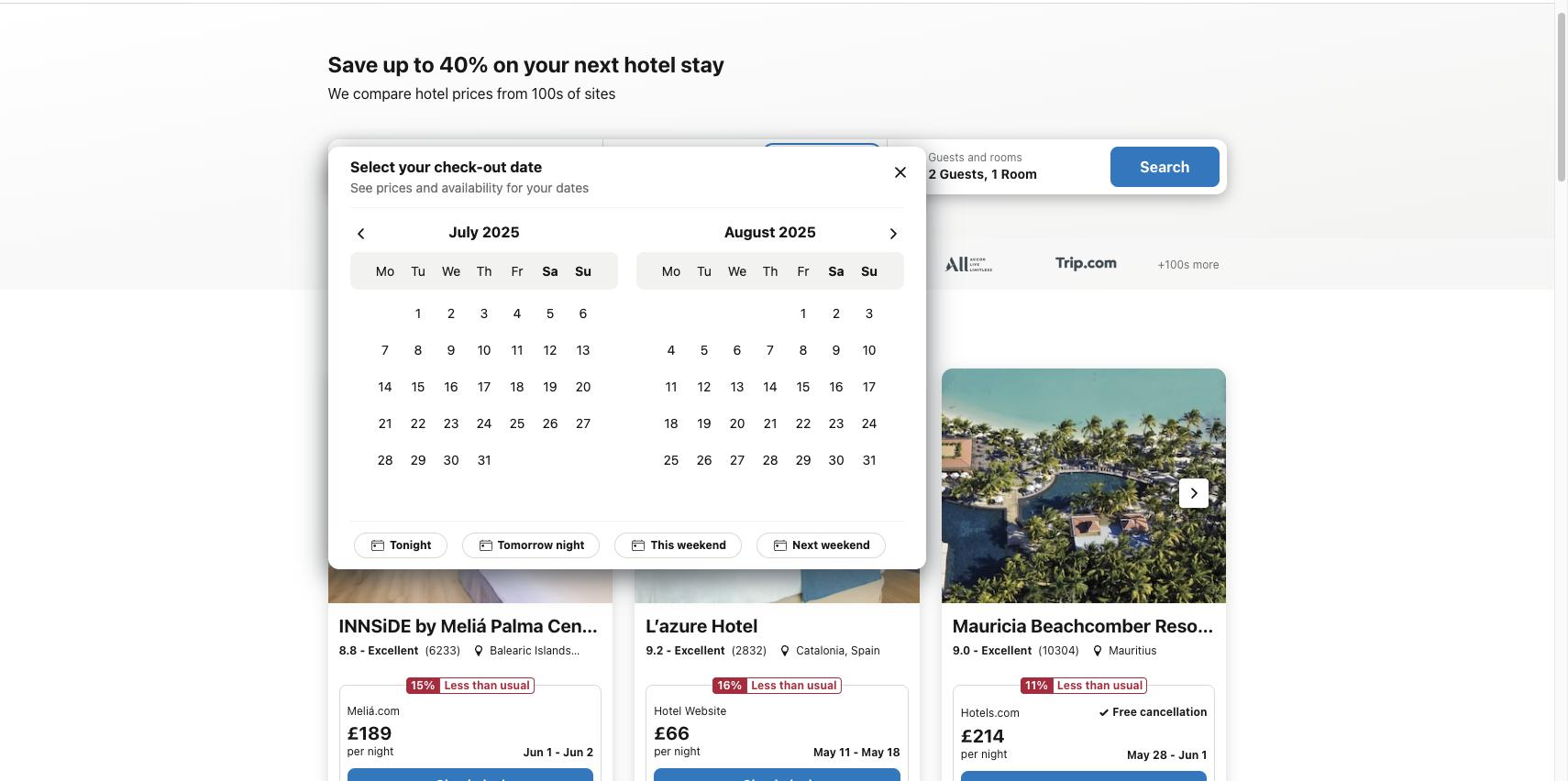
Step 4: Download image

Download a sample screenshot and define the navigation task.
# Example image URL for a web screenshot (replace with your own image)
image_url: str = "https://raw.githubusercontent.com/hcompai/hai-cookbook/445d2017fcc8a0867081ea4786c34f87ed7053eb/data/calendar_example.jpg"

# Download and open image
response = requests.get(image_url, stream=True)
image = Image.open(response.raw)

# Define task
task: str = "Book a hotel in Paris on August 3rd for 3 nights"

print(f"Task: {task}")
image.show()
Holo1 5getstarted Navigationtask Pn

Step 5: Set task and prepare image

Resize the input image, build the task prompt, and process everything into model-ready inputs.
# Resize image according to model's image processor
image_processor_config = processor.image_processor
resized_height, resized_width = smart_resize(
    image.height,
    image.width,
    factor=image_processor_config.patch_size * image_processor_config.merge_size,
    min_pixels=image_processor_config.size.get("shortest_edge", None),
    max_pixels=image_processor_config.size.get("longest_edge", None),
)

processed_image: Image.Image = image.resize(size=(resized_width, resized_height), resample=Image.Resampling.LANCZOS)

# Create the prompt
messages: list[dict[str, Any]] = get_chat_messages(task, processed_image)

# Apply chat template
# Note - For localization we set thinking to False
text_prompt = processor.apply_chat_template(messages, tokenize=False, add_generation_prompt=True, thinking=False)

# Process inputs
inputs = processor(
    text=[text_prompt],
    images=[processed_image],
    padding=True,
    return_tensors="pt",
).to(model.device)

Step 6: Run inference

Because structured output is not enabled and generation is stochastic, parsing the output might fail. In production settings, we recommend vLLM for:
  • Faster inference performance
  • Built-in structured output validation
  • Reliable JSON schema compliance
# Generate response
generated_ids = model.generate(**inputs, max_new_tokens=32)

def parse_reasoning(generated_ids:torch.tensor)->tuple[torch.tensor,torch.tensor]:
    """Parse content from generated_ids"""
    all_ids = generated_ids[0].tolist()
    think_start_index = all_ids.index(151667)
    try:
        think_end_index = all_ids.index(151668)
    except:
        think_end_index = len(all_ids)

    thinking_content = processor.decode(all_ids[think_start_index+1:think_end_index], skip_special_tokens=True).strip("\n")
    content = processor.decode(all_ids[think_end_index+1:], skip_special_tokens=True).strip("\n")

    return content, thinking_content

content, thinking_content = parse_reasoning(generated_ids)

print("Content:", content)
print("Thinking:", thinking_content)


Content: {"x":552,"y":404}
Thinking: 

action = ClickCoordinates.model_validate_json(content)
print("action:", action)

action: x=555 y=405

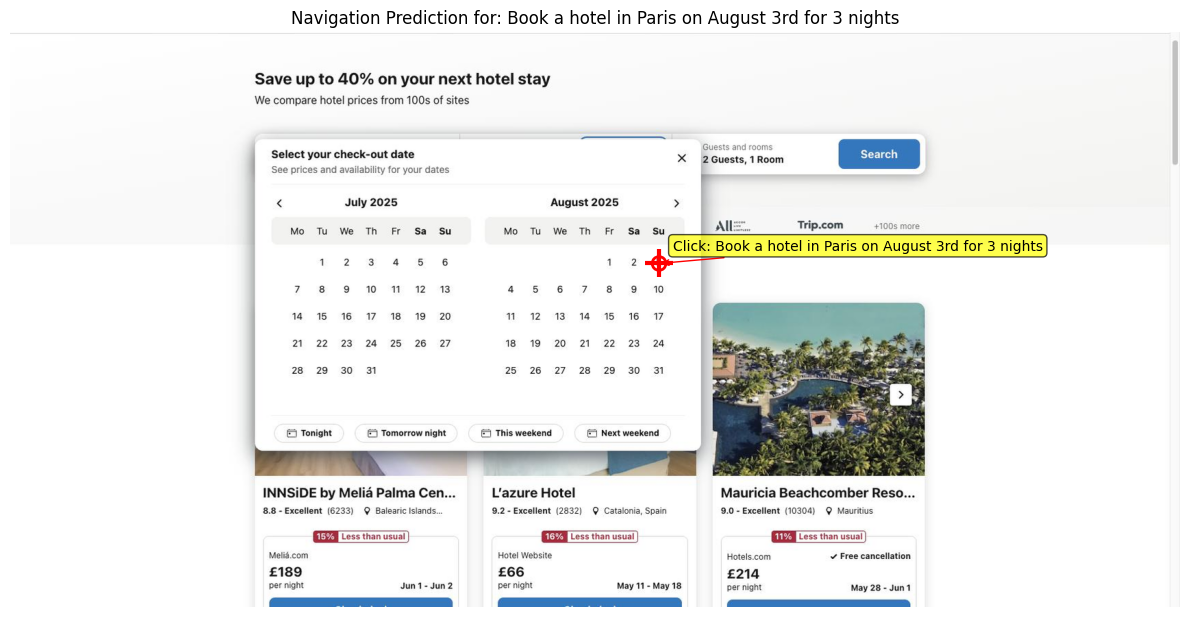
Step 7: Visualize results

Display the model’s predicted click positions on the image, highlighting targets and annotations for easy interpretation.
import matplotlib.pyplot as plt
import matplotlib.patches as patches
from matplotlib.figure import Figure
from matplotlib.axes import Axes


def visualize_click(action: ClickCoordinates, processed_img: Image.Image, task: str = "") -> tuple[Figure, Axes]:
    """
    Visualize the navigation prediction on the image.

    Args:
        navigation_output: The parsed navigation step with action coordinates
        processed_img: The processed PIL image
        task: The task description for the title

    Returns:
        Tuple of matplotlib Figure and Axes objects
    """
    fig, ax = plt.subplots(1, 1, figsize=(12, 8))
    ax.imshow(processed_img)

    x = action.x / 1000 * processed_img.width
    y = action.y / 1000 * processed_img.height

    print(f"Predicted action: Click on '{task}' at coordinates ({x}, {y})")

    # Plot red cross at predicted coordinates
    ax.plot(x, y, "r+", markersize=20, markeredgewidth=3)

    # Add a circle around the cross for better visibility
    circle = patches.Circle((x, y), 10, linewidth=2, edgecolor="red", facecolor="none")
    ax.add_patch(circle)

    # Add text annotation
    if task:
        ax.annotate(
            f"Click: {task}",
            xy=(x, y),
            xytext=(x + 20, y - 20),
            arrowprops=dict(arrowstyle="->", color="red"),
            bbox=dict(boxstyle="round,pad=0.3", facecolor="yellow", alpha=0.7),
            fontsize=10,
        )

    ax.set_title(f"Navigation Prediction for: {task}")
    ax.axis("off")
    plt.tight_layout()

    return fig, ax

fig, ax = visualize_click(action, processed_image, task=task)
plt.show()
Predicted action: Click on 'Book a hotel in Paris on August 3rd for 3 nights' at coordinates (941.2800000000001, 349.92)

Example output

Holo1 5getstarted Visual Pn The image above demonstrates the following:
  • Red cross (⊕): Exact pixel coordinates where the model wants to click
  • Red circle: Visual boundary around the target area
  • Yellow annotation: Description of what element the model identified
The model correctly identified “August 3rd on the calendar” at coordinates (947, 338), indicating precise localization within the complex calendar interface.